|
Teri Solomon’s Bye Bye Birdie
Rehearsal Tape
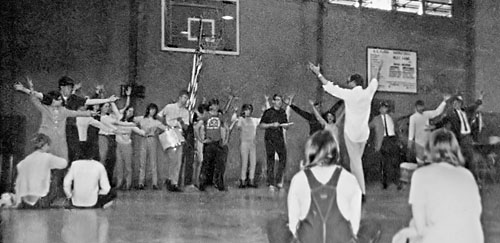
Amazingly, Teri Solomon (Mae Peterson in Bye Bye Birdie) has preserved an early-1968 tape recording of a Birdie rehearsal held in the Flora gym, and Steve Lafferty has restored it for our enjoyment. Here, you can listen to a five-minute sampler from the full-length tape. (To download, right click the link and select Save Link As. On a Mac use Ctrl-click instead.)
Behind the Recording
While we don’t know the exact date of this recording, progress made in performance indicates it likely comes from an early 1968 rehearsal, probably January or February. We do know it was a Flora gym rehearsal.
Here’s Teri’s account of the tape’s genesis:
…I took my father’s new gadget, a tape recorder, to a rehearsal at the school gym. I sort of recall that people were laughing, causing me to laugh, and Mr. Gatlin said or did something to curtail the “breaking out of character.”
One of my strongest memories of that rehearsal period is the killing of Dr. M.L. King. A curfew was enforced in Columbia, and we had to, somehow, work rehearsals around that.
Mr. Gatlin wouldn’t allow us as actors to laugh out of character, but as director he did his share of laughing at our lines! Indeed, the most interesting things about the tape’s content are his interactions with the cast—for example, his head-thrown-back laughter during various scenes and his comment “I’m going to laugh at you every night!”—and the difference in performance quality between the rehearsal tape and the tape of the entire show. Clearly, we all labored in that gym to some purpose!
Rosanne McDowell
A.C. Flora High School
Class of 1969
Full Length Download
The link below requires a username (our school mascot—singular) and password (last name of our school principal at the time). Use all lowercase letters. If you have trouble, please contact us at this email address: 
With the username/password, you can download the 59-min rehearsal recording by clicking here (69MB). Download might take two to five minutes, depending on your Internet connection.
Playing the MP3 File
You can double-click the MP3 file to play it on your computer. To make a CD which will play on any audio CD-player, you can use Windows Media Player or equivalent apps on the Mac.
|